To stay connected at midnight on New Year's Eve 2026, plan for your phone to struggle for a few minutes while the whole crowd tries to call, text and post at once. Schedule your midnight messages in advance, agree a meeting point and a time before you go, keep your battery full and warm, and send a short text instead of calling once the countdown ends.
On Thursday 31 December 2026, huge crowds will gather for the Times Square ball drop, London's fireworks, Edinburgh's Hogmanay, Sydney Harbour and the Burj Khalifa in Dubai. Calls fail, messages sit on "sending", maps stall, batteries die in the cold and groups get separated. This isn't another list of the best places for New Year's Eve. It's the plan for the one minute of the year when every phone around you tries to work at once.
Why your phone stops working in a New Year's Eve crowd
Signal bars show how strong the signal is, not how busy the network is. Each mobile site can only handle so many connections at once, and at the countdown a whole crowd calls, messages, uploads video and opens maps in the same minute. Data slows, calls don't connect and messages wait, even with full bars.
Networks plan for this. Telstra, for example, offers temporary mobile solutions for events with large crowds that boost coverage and add capacity for the duration of the event. That helps, but the midnight spike can still outrun it for a few minutes. Edinburgh's organisers say it plainly: their safety tips warn that phone signal in the area will be limited.
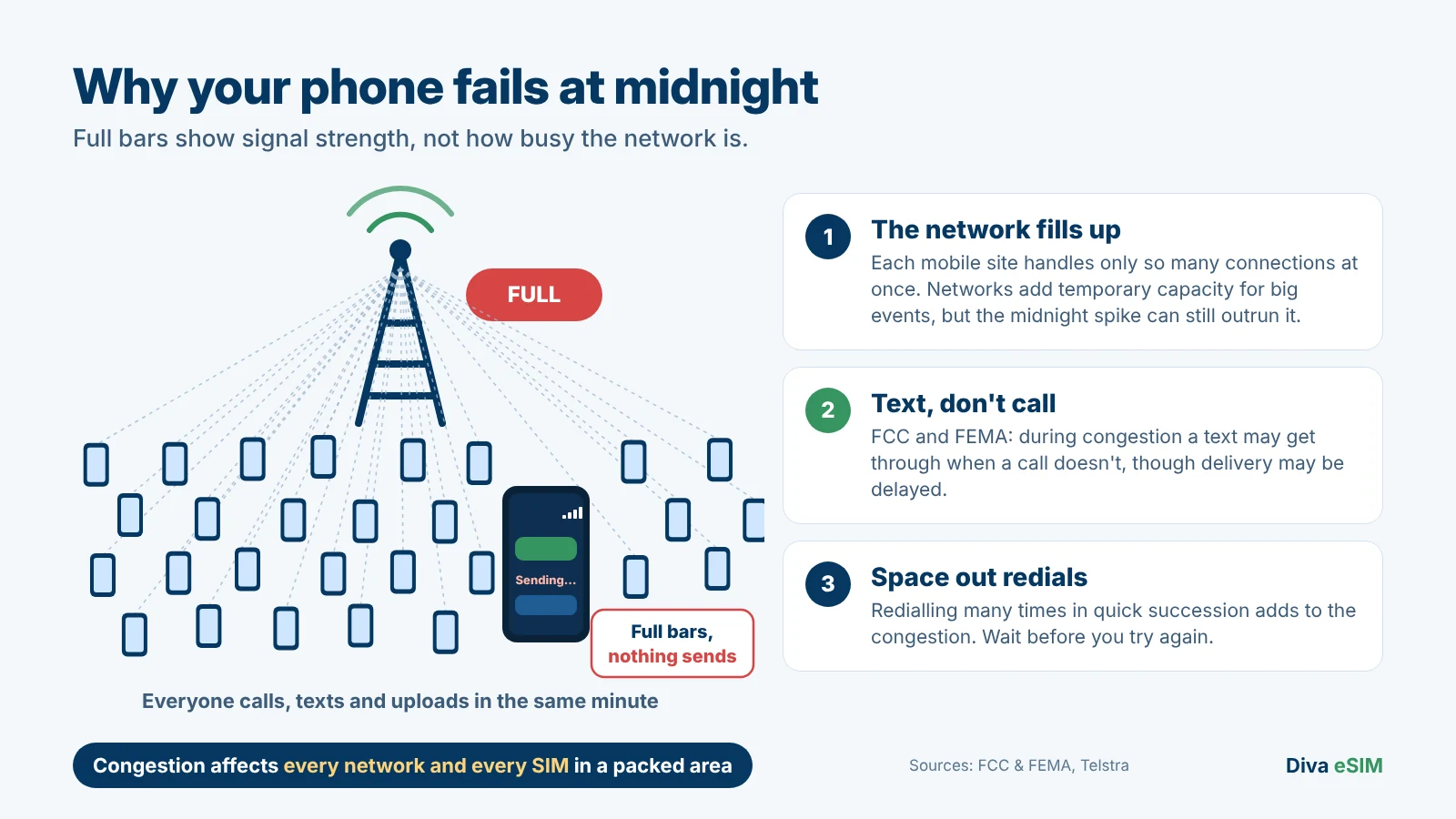
The FCC and FEMA give advice for exactly this kind of overload. During network congestion some calls may not go through, but a text may get through when a call doesn't, though delivery may be delayed. Limit non-essential calls and space out call attempts, because redialling many times in quick succession adds to the congestion. The tips are written for emergencies, but a midnight crowd strains the network the same way.
One honest point: congestion affects every network in a packed area. A travel eSIM, a local SIM and your home SIM all face the same midnight spike, and no SIM, Diva eSIM included, gets around it.
Before you go: the New Year's Eve 2026 phone checklist
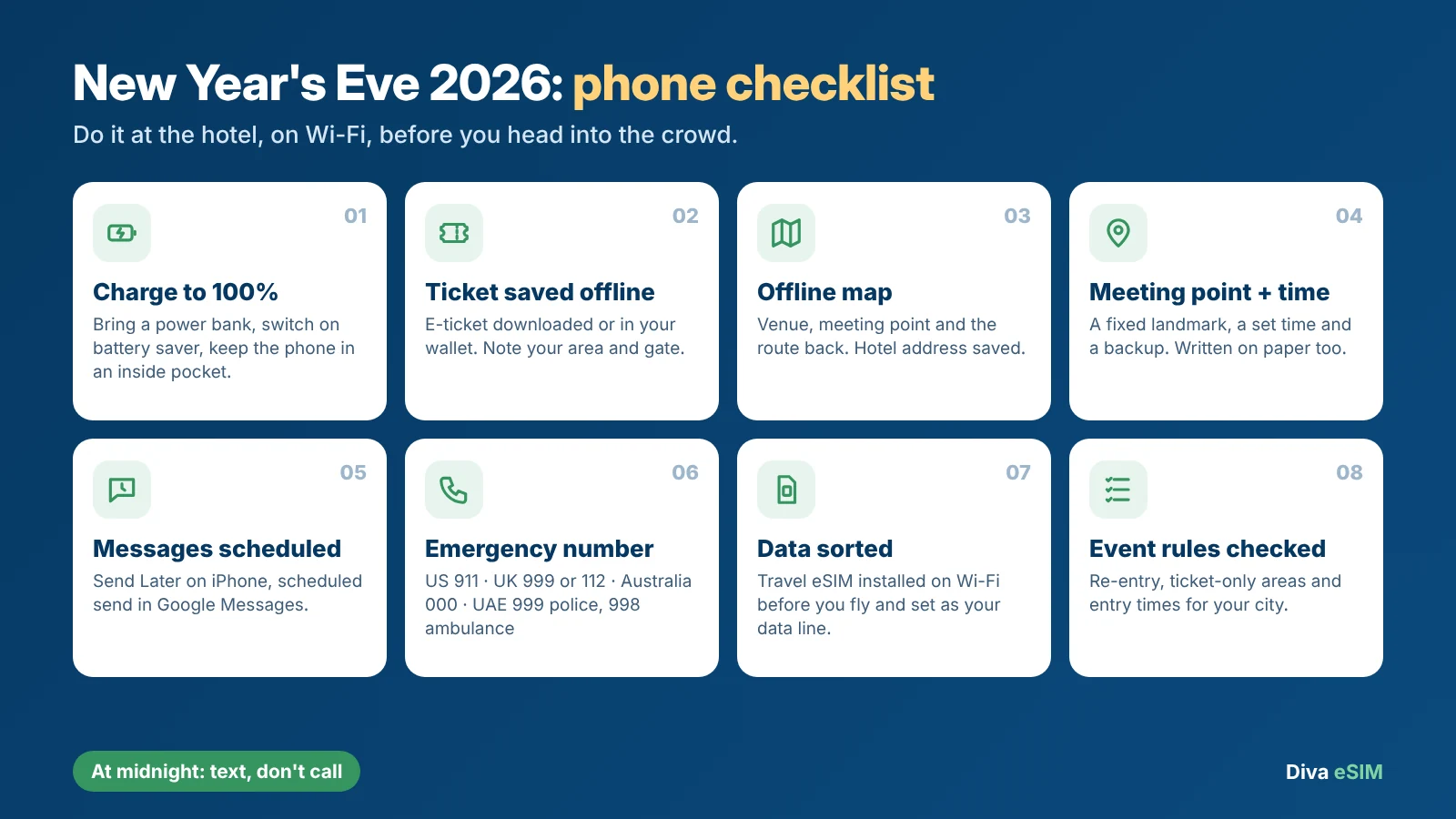
Do these at your hotel while you still have reliable Wi-Fi.
- Charge to 100% and bring a power bank. Switch on battery saver and keep the phone in an inside pocket, where the cold reaches it last.
- Save your ticket offline. Download the e-ticket or add it to your phone's wallet if offered, note your area and gate, and check whether a screenshot is accepted.
- Download an offline map with the venue, your meeting point and the route back to your hotel, and save the hotel address.
- Agree a meeting point and a time, plus a backup point, and write them on paper.
- Schedule your midnight messages now (how to do it below).
- Save the local emergency number (table in the city section).
- Sort your mobile data before you fly. Install a travel eSIM over Wi-Fi at home and choose it as your data line (guides for iPhone and for Android).
- Check your event's rules. No re-entry, ticket-only areas and entry times decide when you need to be in position.
Texts not sending at midnight? How to get your message through
A scheduled message is one less thing to do in a cold, packed square, and it can go through once the network has room. It can't guarantee delivery on the stroke of twelve, so send anything important before midnight.
Schedule an iMessage on iPhone with Send Later
On iPhone with iOS 18 or later, Messages can schedule an iMessage up to 14 days ahead. In the conversation, tap the plus button, tap Send Later, choose the time, then type your message and send it. Apple says a scheduled iMessage is delivered even if all your devices are offline at that moment. You need to be online to schedule or change it, so set it up over Wi-Fi. It works in iMessage conversations; for other chats, write the message in advance and send it when your bars come back.
Schedule a message in Google Messages on Android
In Google Messages (Android 7.0 and up), type your message, then touch and hold the Send button to pick a later time. Google says that if your phone isn't connected to Wi-Fi or mobile data at the scheduled time, the message is sent when your device reconnects, so in a packed square it may go out a little after midnight. That's fine for "Happy New Year", but don't rely on it for a safety check-in.
Text first, call later
Once the clock strikes, follow the FCC and FEMA advice: text instead of calling, and if a call fails, wait a couple of minutes before trying again. Keep it short: "Safe. At the meeting point." Send one message to the group chat, not five, and save photo and video uploads for later.
How to meet up with no signal in a crowd
Getting separated is the real New Year's Eve problem, and shared location lags at midnight too. The fix is older than phones: a landmark, a time and a backup.
- Pick a fixed landmark outside the densest part of the crowd, such as a named corner or a station entrance that will be open. "Near the stage" isn't specific enough.
- Pick a time, not a trigger. "At 12:20am at the north entrance" works without a single bar. "I'll text you after the fireworks" doesn't.
- Agree a backup further out, in case barriers close the first point.
- Write it on paper. Phones die; paper doesn't.
- Meet after the fireworks. Where there's no re-entry, leaving your spot to look for someone means you won't get back in.
If you get separated anyway
- Stop somewhere safe. Don't push against the crowd or stand in an emergency route.
- Send one short message saying where you are and where you're heading.
- Go to the agreed point at the agreed time.
- Ask stewards or police if someone may be hurt or in danger, and call the local emergency number if you need help now.
New Year's Eve 2026 events: the crowd rules that affect your phone
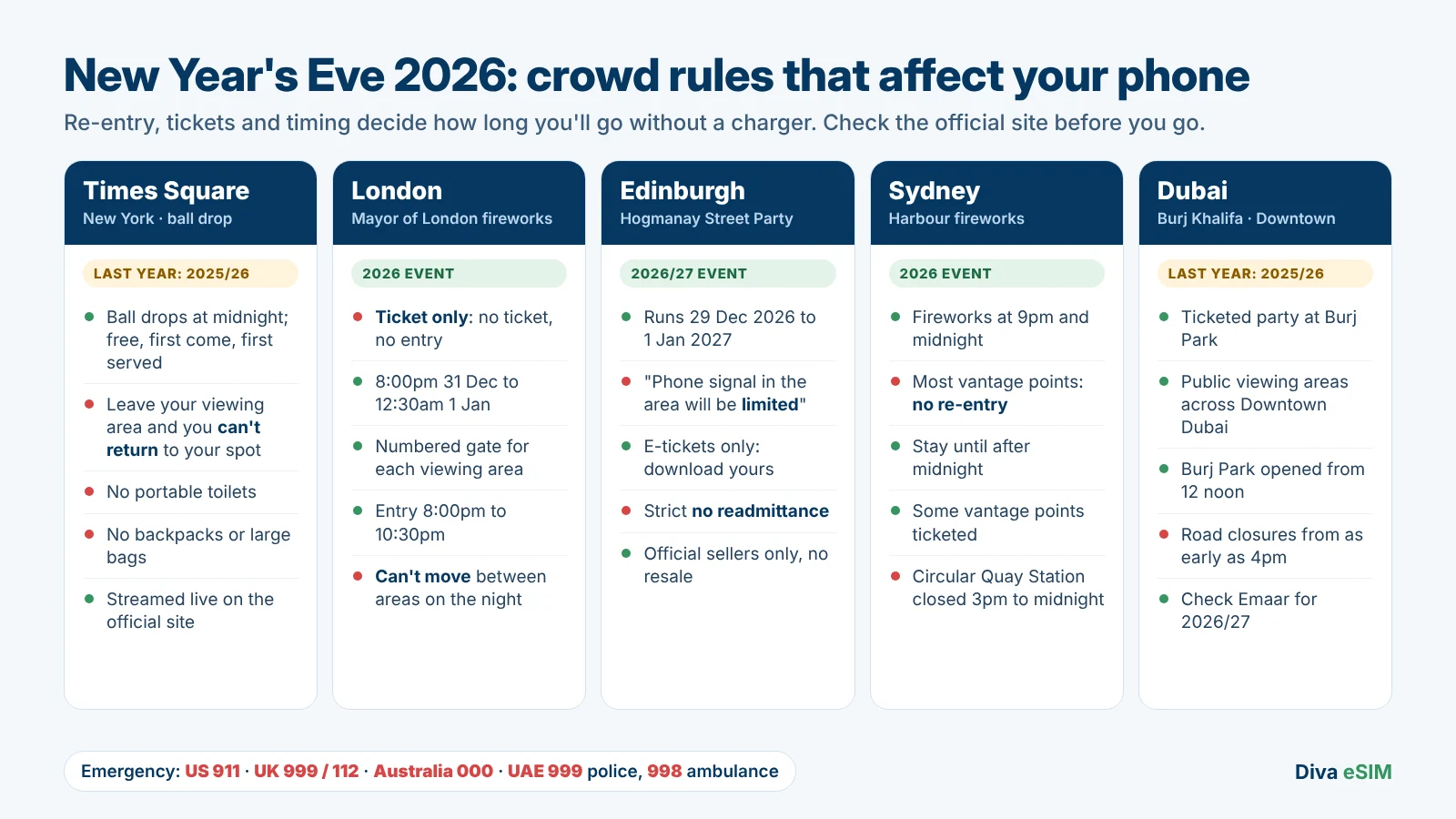
Entry rules decide when you need to be in position, how long you'll go without a charger and whether you can leave to find a friend. Check the official site again before you go.
| Country | Emergency number |
|---|---|
| United States | 911 |
| United Kingdom | 999 or 112 |
| Australia | 000 (112 also works from mobiles) |
| United Arab Emirates | 999 police, 998 ambulance |
Times Square New Year's Eve: cell service in the crowd
The ball drops at midnight on 31 December, welcoming in 2027. In early November 2026 the official Times Square FAQ still described last year's event (2025/26), so treat these as last year's rules. Viewing was free and first come, first served. If you left your viewing area, for example to eat in a restaurant, you couldn't return to your spot. There were no portable toilets, backpacks and large bags weren't allowed, and the show was streamed live on the organiser's website.
That means hours in one spot with no power. Arrive together with full batteries and a power bank each, and meet outside the event area after midnight. Mobile data for the trip is on the Diva eSIM United States page.
New Year's Eve London: tickets, gates and viewing areas
London's fireworks run from 8:00pm on Thursday 31 December 2026 to 12:30am on Friday 1 January 2027, and you can't attend without a ticket (Mayor of London). It has been ticket-only since 2014 (Mayor's press release). Each colour-coded viewing area has its own numbered gate, entry runs from 8:00pm to 10:30pm, and you can't move between areas on the night.
Save your ticket, gate number and the station you'll walk from. Friends need tickets for the same area to watch together, and nobody without a ticket can come in to find you, so meet outside the viewing areas after 12:30am. Data for London and Edinburgh is on the United Kingdom page.
Edinburgh Hogmanay 2026: expect limited phone signal
Edinburgh's Hogmanay runs from 29 December 2026 to 1 January 2027, and the Street Party on 31 December is ticketed. The organiser asks you to arrive with your tickets downloaded and a meeting point arranged, because signal will be limited. The official FAQs say all tickets are e-tickets sent by email, the Street Party has a strict no-readmittance policy, and umbrellas and bags larger than A3 aren't allowed. Resale is prohibited, so buy only from edinburghshogmanay.com, Ticketmaster or Tickets Scotland.
Open the e-ticket before you leave the hotel, keep the phone dry inside your coat, and set a meeting point outside the arena for after midnight so you start 2027 together.
Sydney New Year's Eve: no re-entry at most vantage points
Sydney has fireworks at 9pm and midnight. The official viewing guide says most vantage points don't allow re-entry once you leave, so plan to stay until after midnight. Some vantage points are ticketed, and Circular Quay Station closes from 3pm to midnight, with Wynyard, Martin Place and St James suggested instead.
No re-entry means one spot for the whole evening, so meet outside it after midnight. It's summer in Sydney, so the battery drain is a bright screen through a long wait, not the cold: turn the brightness down. Australian data is on the Australia page.
Dubai New Year's Eve: Burj Khalifa and Downtown Dubai
Emaar's official New Year's Eve site still showed last year's event (2025/26) in early November 2026, so treat this as last year's arrangements. There was a ticketed party at Burj Park, viewing at Dubai Mall and public viewing areas across Downtown Dubai. Burj Park opened to guests from 12 noon, and road closures were expected from as early as 4pm.
With roads closed and a huge crowd leaving at once, ride apps and maps stall. Agree where you'll walk to after midnight rather than where you'll be picked up, and keep a screenshot of your hotel address. UAE data is on the United Arab Emirates page.
Where a travel eSIM fits in, honestly
A travel eSIM doesn't fix congestion: at midnight it faces the same spike as every other SIM. What it fixes is the rest of your New Year's Eve travel.
- Installed before you fly. Diva eSIM delivers each plan with a QR code and a one-tap install link. Check your phone is eSIM-compatible, install over Wi-Fi at home, and it's ready when you land.
- Data at local rates, no daily roaming fee. US, UK and Canadian carriers set their own roaming prices, often a daily charge. Our guide on how to avoid roaming charges explains the options.
- A second line. With the travel eSIM plus your home SIM, your phone has two lines. Switch mobile data to the travel eSIM; data on your home line may cost roaming fees.
- No bill shock. When a plan's data runs out it simply stops: no automatic top-up and no extra charges.
- Check what your plan includes. Most plans are data only, with no phone number. If you need ordinary calls or SMS, check the plan details before you buy.
After the fireworks: getting home
Leaving is when maps and ride apps stall most, because everyone opens them at once. Follow stewards and street signs rather than an app that may not know about closed roads, use your offline route, and book a ride once you're clear of the crowd. A charged phone and a meeting point agreed hours earlier will do more for the first hour of New Year 2027 than refreshing the signal bars.
Frequently Asked Questions
Bars show signal strength, not how busy the network is. In a midnight crowd the mobile site is full, so calls fail and data stalls even with every bar lit.
Comments (0)
Leave a comment